24 Sampler
The sampler chapter below describes the legacy OPAL sampling workflow. It is not currently mirrored as a corresponding OPALX user feature.
The sampler is a companion to the optimizer. Instead of evolving a multi-objective population, it generates samples of the design variables and runs the corresponding simulations. This is useful for surrogate-model training, validation studies, and uncertainty quantification.
24.1 Sampler OPAL Commands
The syntax is intentionally close to the optimizer syntax, especially for the shared DVAR definitions.
24.1.1 Basic Syntax
Design variables are still defined through DVAR. The sampler then specifies how each design variable is sampled and how the resulting combinations are evaluated.
24.1.2 SAMPLE Command
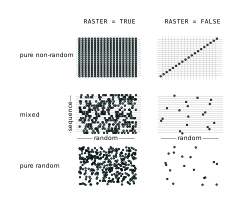
SAMPLE controls the overall sampling run and whether the per-variable sample sets are combined in raster or non-raster fashion.
| Attribute | Meaning |
|---|---|
RASTER |
Choose raster or non-raster combination of the individual sample sets |
INPUT |
Path to the input or template file |
OUTPUT |
Base name for generated result files |
OUTDIR |
Directory where simulations and results are written |
DVARS |
List of design variables to sample |
OBJECTIVES |
Quantities to evaluate and store for each sample |
SAMPLINGS |
Sampling-method definitions |
NUM_MASTERS |
Number of master ranks |
NUM_COWORKERS |
Number of worker ranks per simulation |
TEMPLATEDIR |
Template directory |
FIELDMAPDIR |
Field-map directory |
DISTDIR |
Distribution directory |
KEEP |
File extensions that should not be deleted after evaluation |
RESTART_FILE |
Optional H5 restart file |
RESTART_STEP |
Restart step inside the H5 restart file |
JSON_DUMP_FREQ |
Frequency of appending finished samples to the JSON result |
Raster versus non-raster mode
RASTER=TRUE: evaluate every combination of the per-variable sample pointsRASTER=FALSE: evaluate aligned sequences, giving a total count equal to the minimum sample count across all variables
So with raster mode the total sample count is
\[ N = N_1 \times N_2 \times \cdots \times N_n, \tag{24.1}\]
whereas with non-raster mode it is
\[ N = \min(N_1, N_2, \ldots, N_n). \tag{24.2}\]
24.1.3 SAMPLING Command
Each SAMPLING definition describes how one design variable is sampled.
| Attribute | Meaning |
|---|---|
VARIABLE |
Name of the corresponding design variable |
TYPE |
Sampling method |
RANDOM |
Random or sequential mode |
SEED |
Random seed; default 42 |
STEP |
Step size for randomized sequences |
FNAME |
File containing sample values |
N |
Number of samples for this variable |
24.1.4 Available Sampling Methods
The legacy manual documents:
| Method | Meaning |
|---|---|
FROMFILE |
Read values from a named column in a file |
UNIFORM |
Uniform floating-point sampling between lower and upper bounds |
UNIFORM_INT |
Uniform integer sampling between lower and upper bounds |
GAUSSIAN |
Gaussian sampling, with bounds interpreted as +-5 sigma |
LATIN_HYPERCUBE |
Random Latin-hypercube sampling |
RANDOM_SEQUENCE_UNIFORM_INT |
Randomized integer sequence sampling |
RANDOM_SEQUENCE_UNIFORM |
Randomized floating-point sequence sampling |
The method semantics depend on whether RANDOM is enabled:
- in sequential mode, the command generates a deterministic sequence
- in random mode, the same method produces randomized samples from the same bounds or file source
24.2 Example Input File
The original manual gives a complete example in Sample.in:
nstep: DVAR, VARIABLE="nstep", LOWERBOUND=10, UPPERBOUND=40;
MX:    DVAR, VARIABLE="MX",    LOWERBOUND=16, UPPERBOUND=32;

SM1: SAMPLING, VARIABLE="nstep", TYPE="FROMFILE", FNAME="samples.dat";
SM2: SAMPLING, VARIABLE="MX",    TYPE="UNIFORM_INT", SEED=122, N=6;

SAMPLE,
    RASTER        = FALSE,
    DVARS         = {nstep, MX},
    SAMPLINGS     = {SM1, SM2},
    INPUT         = "Ring.tmpl",
    OUTPUT        = "RingSample",
    OUTDIR        = "RingSample",
    TEMPLATEDIR   = "template",
    FIELDMAPDIR   = "Fieldmaps",
    NUM_MASTERS   = 1,
    NUM_COWORKERS = 1;
QUIT;
The accompanying samples.dat file provides named columns for the FROMFILE-based sampling source. The template file then uses placeholder variables such as _nstep_ in the same way as the optimizer.